Don’t forget a little dash a.
Typos are too easy. I have to laugh about this one though…
I needed to quickly add a user to a server I administer and make sure they could read/write within the web server’s document root without giving them sudo rights. 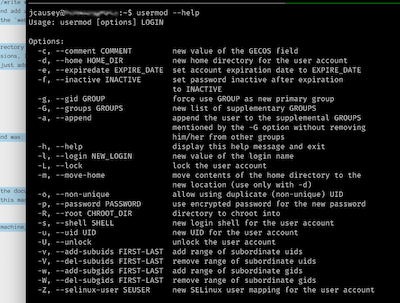 Simple; create the user
 newuser and add a new group webadmin real quick to allow that group write permissions in the directory. Put the new user into the webadmin group and Bob’s your uncle. Simple.
Why not add myself to that group too, so that I don’t have to sudo to modify the directory either? We had locked the files in there to remove write permissions earlier, but if I’m setting up group permissions, I might as well take advantage of that as well. Probably should have done that a long time ago… Let me just add myself to the group:
sudo usermod -G webadmin myusername
Done and done.
Did you catch the error? (I didn’t until it was too late.) The correct command was:
sudo usermod -aG webadmin myusername
Yep. I just replaced all my groups (including sudo) with just one: webadmin. Sure, I can write in the document root now, but I’m not really the admin anymore. And I’m working remotely, so there is nothing I can do on this machine to fix that without going on site. 🤦♂️
Sometimes it’s the easy things that get you.
-a
Of all the changes brought about by the continuing COVID-19 epidemic, here is a minor one that made me a bit nostalgic
today:
Students may never again know the anticipation, relief, and sheer joy of a “snow day”.

Now that educational institutions have figured out that classes can suddenly switch to “remote-only” delivery, the
tendency seems to be to do this at the drop of a hat - or a snowflake, in this case. Don’t get me wrong: From a
teacher’s point-of-view, I’d much rather be able to keep delivering lessons so that we don’t get too far behind on the
syllabus… But there is just something a little magical about Mother Nature suddenly handing out a little surprise
“holiday”.
I don’t know any student who doesn’t (or, well… didn’t) look forward to snow days. For that matter, even most
faculty seem to have their spirits lifted a bit by the prospect of an unexpected “day off”. These things don’t happen
very often where I’m from (Northeast Arkansas / Southeast Missouri area). We usually have rather warm winters with
little to no snow accumulation. And sometimes we get ice - but that’s a different story.
I remember when I was quite young we had a snowfall that one could measure in “feet”… It blew and drifted several
feet high - taller than me at the time. My friends and I spent that particular snow day (it was more like a “snow
week” that year) building snow forts large enough we could crawl around in them from “room” to “room”. Actually, these
were a lot more like “snow caves” that we built by tunneling through the huge drifts. We were like Tolkien’s dwarves
delving the Mines of Moria. Luckily we didn’t find a Balrog at the bottom like Durin did - just some cold dirt and
dead grass. I’m sure there were snowmen and snowball fights, but I remember the tunnels. Oh, and fresh snow cream
when we finally went inside to warm up.
The snow that fell here today as I’m writing this won’t be measured in “feet”, but it was absolutely more snow on the
ground than we’ve seen in several years. And of course, all of us in academia in any capacity are staring out windows
fantasizing about what could have been if only we hadn’t discovered Zoom. I’m sure somewhere out there students are
quietly slipping away from their streams to build snowmen and get into raucous snowball fights. I hope so, anyway.
Fight the system! Or at least declare a snow day now and then.
We live in a time when companies are beginning to “wake up” to the reality of how vital (and difficult) digital security can be. At the same time, public awareness of the need for security is increasing.
But there is a difference between making a site that says it is secure and making a site that is actually both secure and usable. Here is a story about how not to do it.
 I recently decided to try out a new digital game camera that has cellular radio capability. Online reviews raved about the Moultrie MCG-13310, so I bought one. In order to access the images from the camera remotely, Moultrie requires that you set up a “Moultrie Mobile” account. Fine, I get it. They want to be in control of your images, and they want to be your primary gateway you your images. I don’t love that, but it’s not so different from e.g. Wyze Cams or many other digital connected devices these days.
The Moultrie Mobile sign-up process is atrocious. For one thing, they want to know a lot about me just to start an account (not even for billing - we’re not there yet). Do I trust these guys to keep my info safe? I have no idea! I’ve never had any dealings with their site so far; I have no reason to trust them. I grumbled and pressed on.
Soon, they want me to create a password. The instructions seem OK:
(Password must be at least 8 characters long with one special character from the following: !@#$%^&*()+)
So I set a strong password with the help of my password manager and I pressed on. The site happily accepted the password and did the email-confirmation step. Then it redirected me to log in for the first time…
“The email or password is incorrect” — What? Well, since I use a password manager, I know I didn’t mis-type it. I’ve seen this before. Moultrie’s password instructions are hiding the fact that their implementation is more limited than they are letting on. Beware of this dark pattern: Now I don’t know which thing I did that didn’t pass some filter in their login process. Was it one of the special characters I chose? Was it the length of the password? I have no idea.
Experience tells me the password length is the most common culprit when other sites have given me this sort of issue, so I clicked “Forgot Password?” to try and set a shorter one. Now it becomes a race to the bottom. Just how short does this thing need to be? I went from > 60 characters to 40, 31, 26, all the way to 16. Nothing worked. What the hell, guys?
I finally decided that maybe their instructions were literal. Maybe when they say “one special character”, they really mean only one??? So I tried entering a password with 16 characters where one was a special character from their list. I got a little red message: “Enter a valid password”. Hmm… I tried a different special character and didn’t see the message.
Moultrie’s password rules are a lie. Some of the special characters in their list don’t seem to satisfy their filters. I tried adding each one in turn to map out what triggered the red text and which didn’t. Look like they actually accept: !@#$%^& but not *()+.
Don’t let me set a password you won’t actually let me log in with! And, while we’re at it: Don’t lie about your password requirements. Be clear. Set good minimum requirements, don’t force a maximum — but if you do be honest about it.
In the end, I got the account set up – it was the incorrect instructions about special characters that was the problem, not the length of the password or the number of special characters allowed. But it took 5 different passwords and over 30 minutes to figure out a combination that worked. Not great UI, for sure.
PS: Do I trust these folks who couldn’t make the sign-up process work correctly? NO. No I do not. They’ll be getting a one-time-use credit card number and as little of my real personal info as possible. Not a good impression, Moultrie.