It seems like everybody is releasing agent sandboxes these days; I guess I am too. I saw an article on Hacker News recently about Microsoft’s release of MXC, and I wanted to try it out. I ended up wrapping a CLI application around it to make spinning up a new sandbox to wrap a coding harness quick and easy.
But why? Claude has a sandbox, and so do other harnesses. Why not use that one? Well…
Claude is quick to bypass its sandbox whenever the going gets tough!
So here I am, putting my “sandboxed” Claude1 in a sandbox. Because sometimes your decorative moat needs a real moat. I (and by “I”, I mean mostly Claude under my direction as chief critic) built boxed, which wraps MXC in a command-line tool that makes it easy to launch a tool within the sandbox, and so far I am loving it. I’ve shared it on my Github, so you can try it out (or just ask your agent friends to build one for you). It’s the trendy thing to do these days, after all.
PS: Why not use any of the numerous sandboxes or containers out there already? This was more fun!
OK, I happily admit that the sandbox bypass in the image is not serious; in fact, Claude is doing something that I wanted it to do. But I’ve also had it do some things I was less happy about (and I wasn’t in the mood to capture a screenshot at those times). But mostly, if your pet lion can choose to leave its enclosure any time it likes, you’re not really protected from your lion. I like my lions; I just don’t want them to maul me or chew on my stuff. ↩︎
A bit over a year ago, I posted some thoughts on alternative ways of archiving a directory full of large files. I compared tar, SquashFS, and DwarFS archives on the raw files and a Borg Backup archive of the files. The interesting thing I noted at the time was that DwarFS was much slower than the other alternatives for some reason. Others have not reported this, so I leaned toward blaming the hardware (an old Intel MacBook Pro).
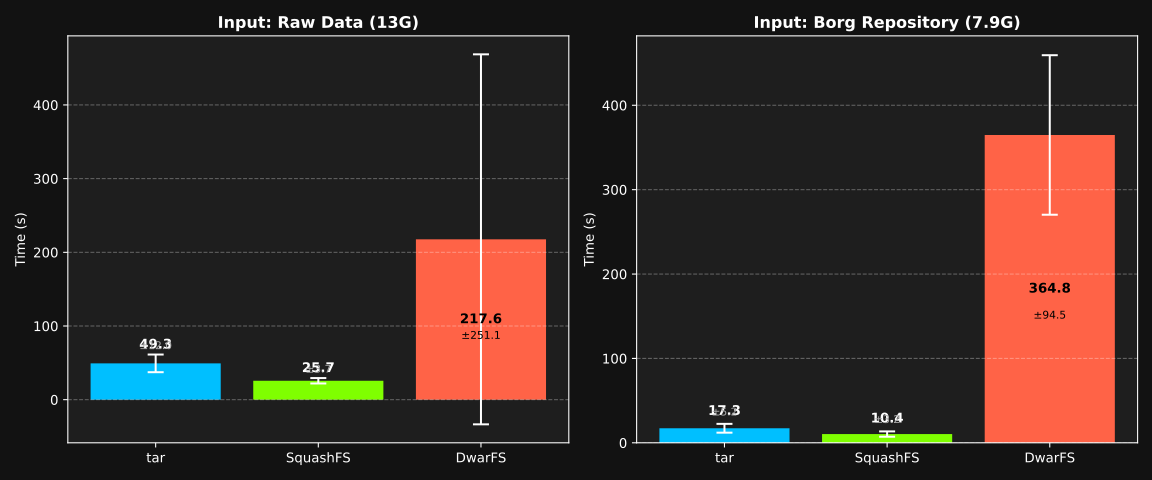
I noticed that DwarFS has been updated a few times since then, so I thought it would be worth repeating the comparison with the same laptop but newer versions of the tools.1 I found that the trend still holds, and I also discovered that DwarFS has a huge variance in run time, and I’m not sure why. For this year’s charts, I’ve added error bars showing the standard deviation of three runs of the same protocol.
Figure 1: Creation time in seconds.
Notice that sometimes DwarFS goes pretty fast, and sometimes it is very very slow. In fact, it ranged from 30 to 502 seconds! The other tools are more consistent. I still have no idea why I’m seeing strange performance characteristics from DwarFS.
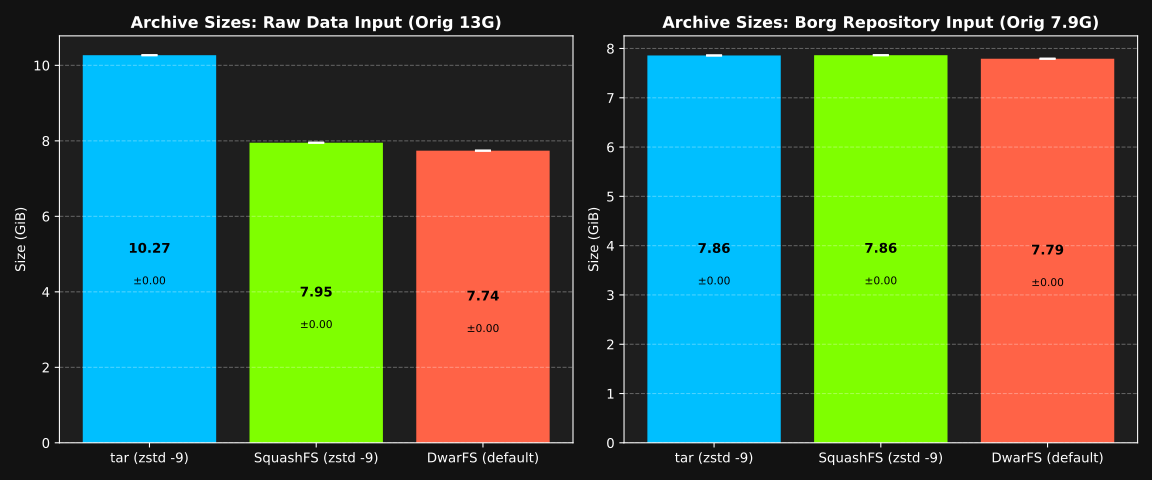
DwarFS still wins in archive size (smaller is better), but not by much. This graph didn’t change much at all from last year2:
Figure 2: Resulting archive size (in bytes).
DwarFS version: v0.15.1 [2026-03-21], BorgBackup version 1.4.3, bsdtar version 3.5.3. ↩︎
The Borg repository size in the second chart title is a bit different; it is the same dataset, but I think a version change in Borg Backup might explain it; or it is an artifact of recreating the borg archive. I’m not entirely certain. ↩︎
Over the Thanksgiving holiday, I discovered cooklang and started experimenting with it. My first impression was “ewww”—I didn’t like that you couldn’t have ingredients without steps. Many of my own “recipes” are just a list of ingredients, so I don’t forget what flavors I used in a dish. The “steps” come from memory, or instinct, or whatever. Cooklang does not play well with this style of “recipe”.
But I started converting some recipes I’ve either written “correctly” to share, or found somewhere online. Although the conversion process is tricky sometimes (LLMs help a lot, but you have to do some editorial passes to get it just right), I ended up with a nice database of scripting-friendly recipes.
I like the idea of the point-of-use declaration syntax for keeping a recipe internally consistent. When making changes or writing a recipe in a hurry, it is easy to forget to mention an ingredient, or to forget to list an ingredient that is mentioned in the steps. Cooklang handily eliminates this problem. So, once I stopped thinking of it as a “Markdown for recipes” and started thinking of it as a computer language for recipes, I started appreciating it more. It really is a storage format, not a presentation format.
To really appreciate cooklang, you need good conversion tools. You need to be able to convert a “traditional” recipe into cooklang, and you need to be able to convert cooklang into a nice presentation format (where it looks like a traditional recipe). Luckily, the community has already created most of these tools. I wasn’t able to find a Markdown recipe to Cooklang converter though, so I started writing one that uses a few passes through Claude to convert and verify the conversion, plus handling additions of ingredients to your “aisle.conf” file. I don’t think my tool (which was largely “vibe coded” with Claude) is ready for prime-time yet, but if I polish it up a bit I may release it on Github later.
Honestly, this is the best solution I’ve found so far for the one thing that sends me down this rabbit-hole every single year: Creating a detailed and organized shopping list given a meal plan. Totally scriptable (and the cook tool does it out of the box). Nice. What I still miss is a really good looking PDF output option. I’m working on that too, and I have something that is about 85% of what I want. I guess that’s half the fun, right?

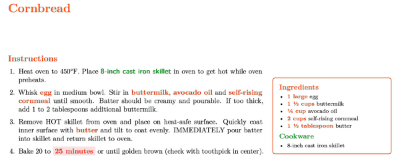 The “steps” come from memory, or instinct, or whatever. Cooklang does not play well with this style of “recipe”.